☰
TikZ Editor v0.4.0
WYSIWYG editor for TikZ diagrams in LaTeX
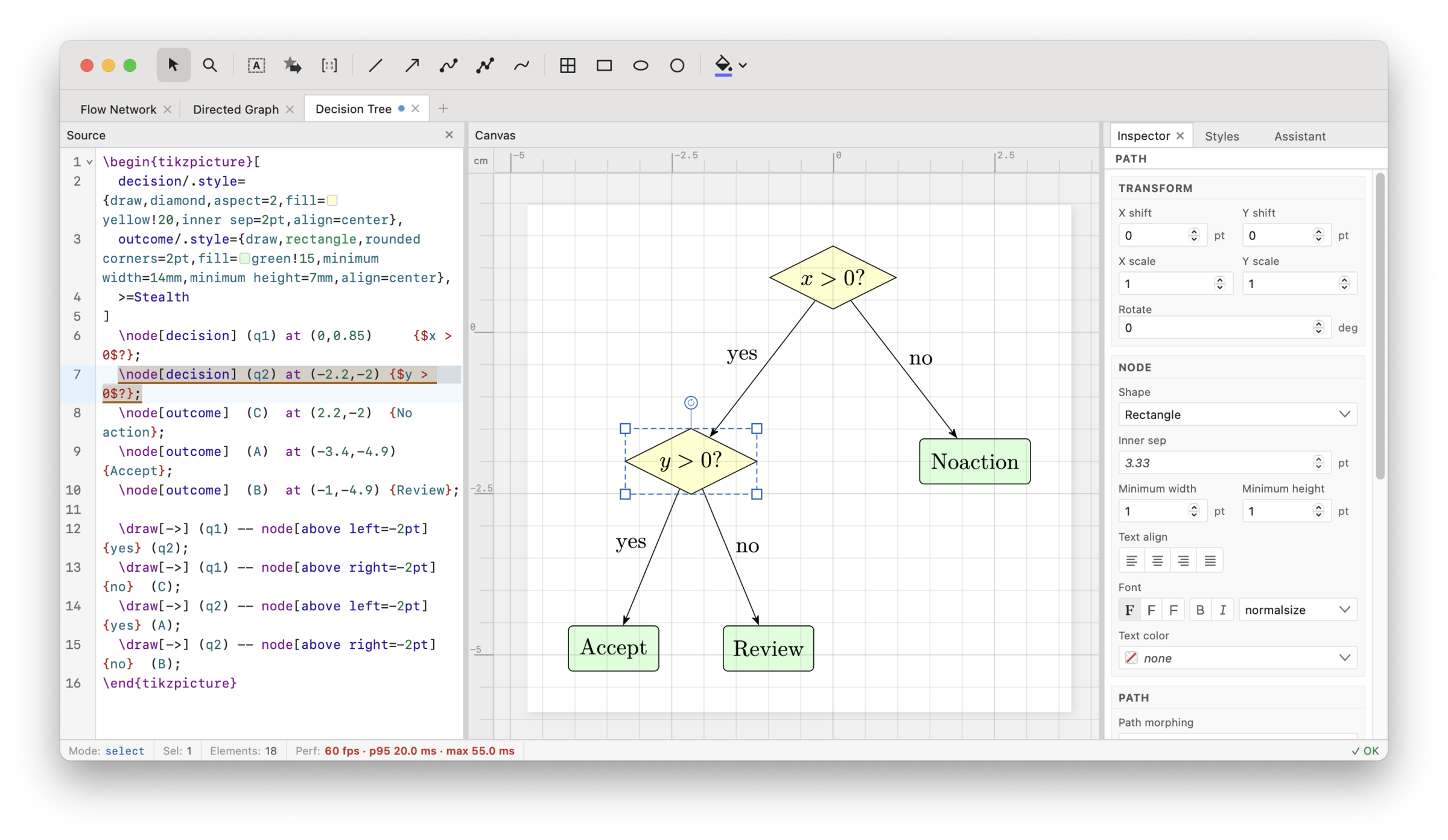
You can start from scratch or edit an existing TikZ figure, or even directly open your paper tex file to edit its images. The TikZ code gets instantly updated as you move around elements, without disturbing existing formatting such as line breaks and spaces.
The app makes fine-tuning the positions of elements easy and instant, without needing to recompile. It supports all common TikZ features including \foreach loops.
The app is free and open source (MIT licensed, code on GitHub). It works on the web or as a lightweight desktop app with some extra features.
Download AppImage for Linux 86.1 MB
or choose deb · rpm · other platforms
Drag elements to update or finetune locations
Instead of manually changing code coordinates, you can now just drag paths or nodes to where you want them, and the code updates instantly.
\node[draw, circle] (s) at (0, 0) {$s$};\node[draw, circle] (t) at (2, 0) {$t$};\draw[->] (s) -- (t);
Add new elements to figures
Tools are provided to add new paths (lines, arrows, multi-segment paths) as well as nodes, rectangles, and circles. New elements get inserted at the end of your code. And of course you can immediately move or resize those elements.
``
tooltip-hover.tex
7 \node[draw, rounded corners, 8 fill=blue!12, minimum width=18mm]9 (start) at (0,0) {Draft};
rounded corners
default 4pt
Rounds corners on rectangle and path joins.
Can be combined with rounded corners=2pt.
Full-featured source editor tailored to TikZ
The source panel always shows the current source. It has syntax highlighting for TikZ, allows code folding to hide the details of a scope, and shows snippets from the TikZ manual on hover.
It highlights errors with clear explanations of what's wrong (which is possible because the app does not use a tex compiler to understand your code).
You can also edit colors and numbers directly in the source view without typing, using a color picker and number scrubbing.
Many convenience features are provided
The app supports snapping which easily allows you to align elements vertically or horizontally, and make sure they are spaced at equal distances. It also features rulers and customizable guide lines, as well as zoom and a magnifying glass tool.
\node[draw] (A) at (-1.1, 0.8) {A};\node[draw] (B) at (1.1, 0.8) {B};\node[draw] (C) at (-1.1, -0.8) {C};\node[draw] (D) at (0.2, -0.1) {D};
Native support for common TikZ features
The app allows you to produce idiomatic TikZ figures. For example, paths can easily be drawn so they attach to node anchors. The app also has support for editing node labels and pins, as well as edge labels.
\node[draw, fill=blue!10] (s) at (0, 0) {Start};\node[draw, fill=green!10] (t) at (3, 0) {End};
Multi-selection for grouping and aligning
You can select multiple objects and group them (implement using TikZ scopes) as well as use layout features including align and distribute.
\node[draw, fill=blue!10] (l1) at (-1.7, 1) {Start};\node[draw, fill=blue!10] (l2) at (-2, 0) {Mid};\node[draw, fill=blue!10] (l3) at (-1.3, -1.3) {Bottom};\node[draw, fill=green!10] (r1) at (1.9, 1) {End};\node[draw, fill=green!10] (r2) at (2.2, 0) {End};\node[draw, fill=green!10] (r3) at (1.8, -1.3) {End};
Multi-figure support so you can open the full paper
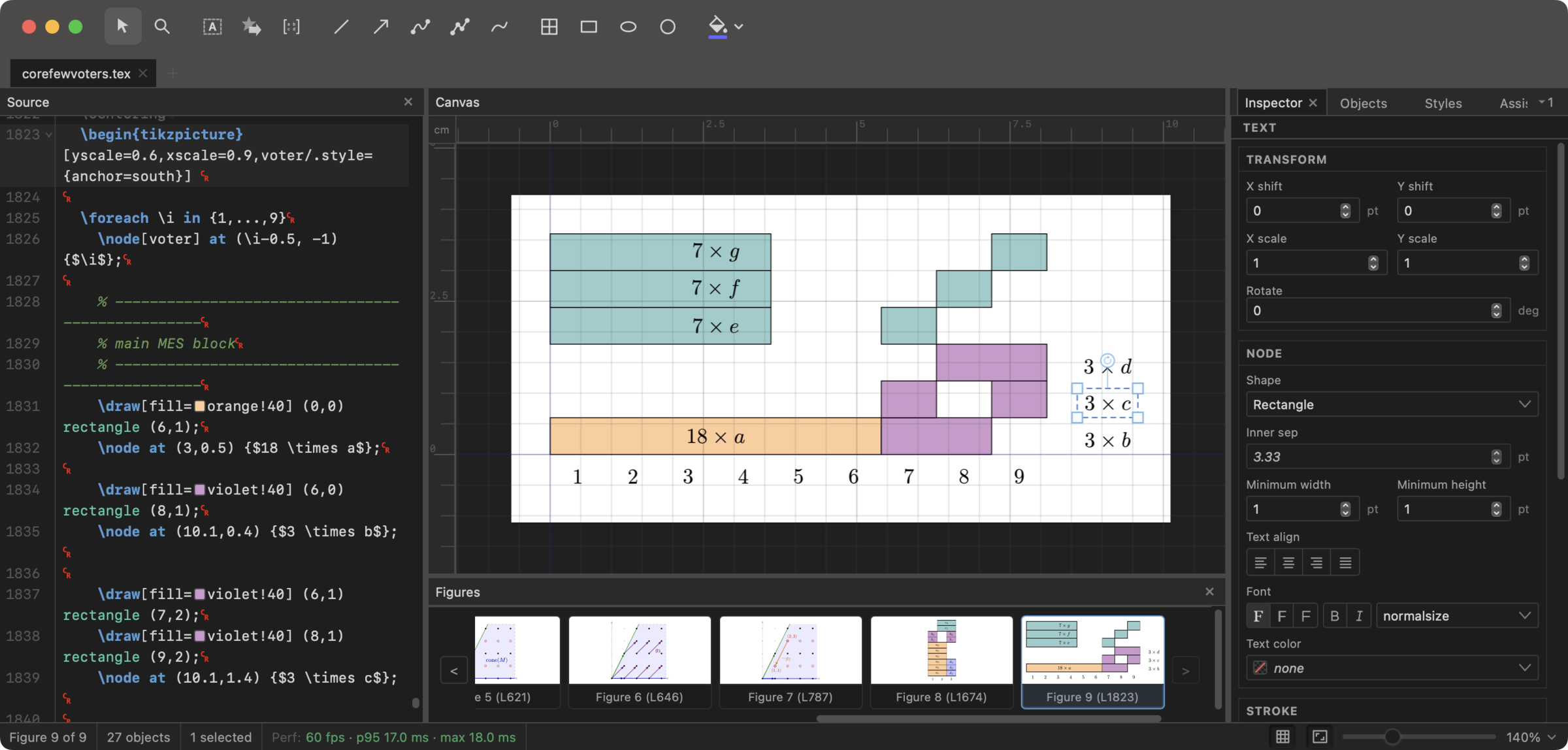
Open a full .tex paper file and directly edit its figures. Figure previews at the bottom of the app make it easy to switch between the different tikzpicture environments in your paper. The app understands many of your custom macros.
Ask AI for help editing your figures
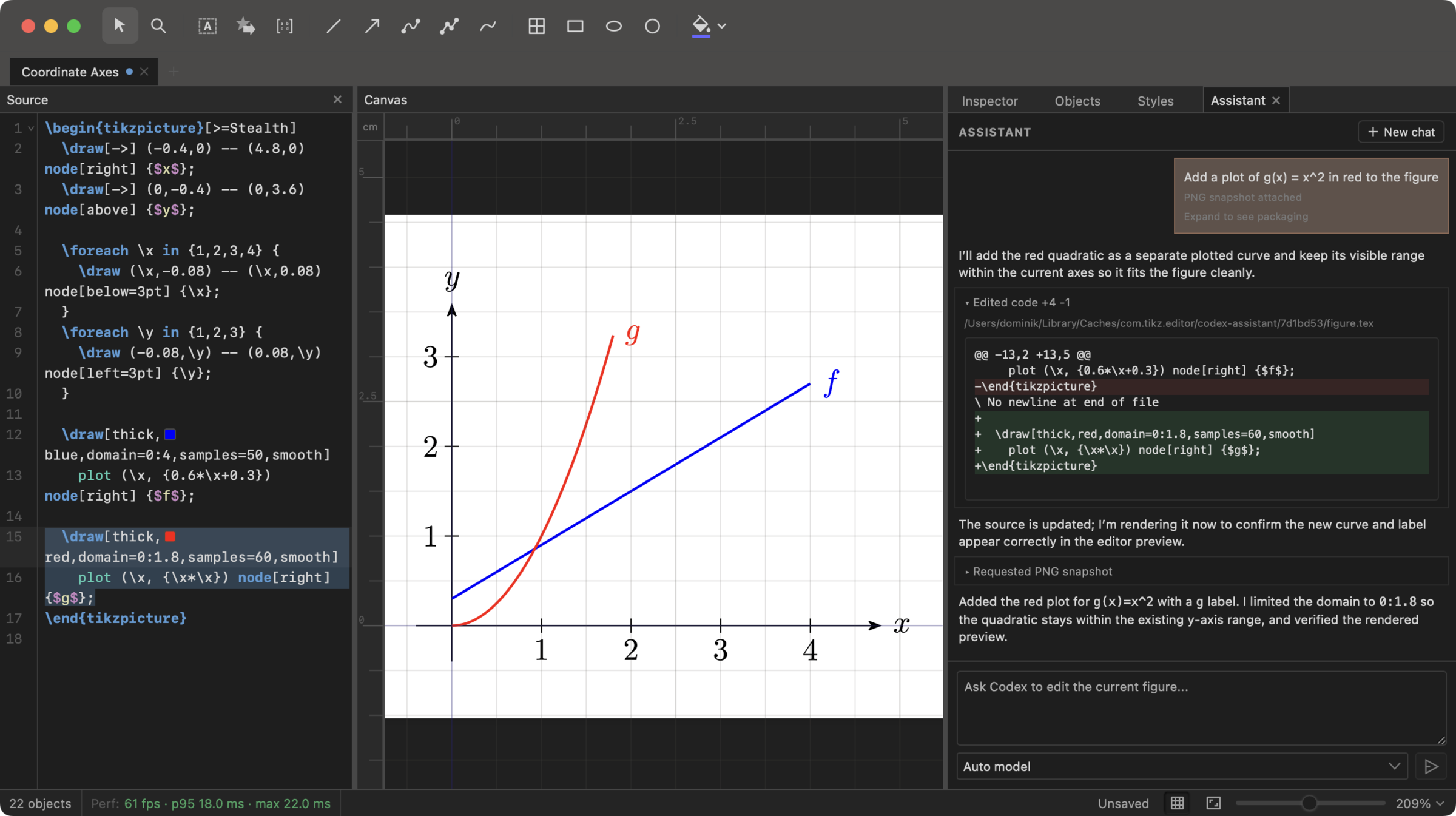
On the desktop version, if OpenAI Codex is installed, you can ask GPT to edit your figure directly in the app. The assistant has access to several TikZ-specific tools. Usage draws from your ChatGPT account.
Available tools
Select
Move, resize, and rotate objects, edit paths, and multi-select to edit multiple elements at once.
Magnify
A virtual magnifying glass to look at details in the figure, similar to TeXstudio.
Node
Add text to the figure using a TikZ \node.
Shape
Add a node using the shape library. Can add text. Examples: diamonds, polygons, stars, clouds, arrows.
Matrix
Insert a matrix of nodes with a chosen number of rows and columns.
Line
Draw a straight TikZ \draw path.
Arrow
Draw a straight TikZ \draw[->] arrow.
Bezier
Draw a curved path between two points.
Path
Build multi-segment paths with straight and curved parts.
Freehand
Draw a freehand path with smoothing.
Grid
Draw a grid path.
Rectangle
Draw a rectangle path.
Ellipse
Draw an ellipse path.
Circle
Draw a circle path.
Bucket
Apply a fill color to an existing closed region.
List of editor features
Files and export
- Open and edit
.texand.tikzfiles. - Import figures from SVG, Ipe
.ipe, and PowerPoint.pptx. - Export to SVG, PNG, PDF, or standalone LaTeX.
- Work across multiple open documents with tabs.
Papers and figures
- Open a full paper with multiple figures, and navigate between figures using thumbnail previews.
- Draw nodes, shapes, matrices, arrows, paths, curves, grids, rectangles, ellipses, and circles.
- Edit text and equations directly in the figure.
Direct editing
- Move, resize, rotate, duplicate, group, align, distribute, flip, and reorder objects.
- Edit paths with point handles, split/join, reverse, open/close, corner, and smooth point commands.
- Use snapping to grids, guides, object points, and object gaps.
Loops and structures
- Use the Repeat dialog to add a
\foreachloop, copying the selection into multiple rows and columns. - Open and edit figures that already use
\foreach, including nested loops. - Add labels and pins to nodes.
- Edit tree diagrams by adding children and edit matrices with row/column and transpose commands.
Panels
- Inspect and edit stroke, fill, arrows, text, transforms, shapes, and styling in the Inspector.
- Manage object visibility, grouping, renaming, and layer order in the Objects panel.
- Edit TikZ styles in the Styles panel, similar to CSS editing in browser devtools.
Source and assistant
- Use the source editor with syntax highlighting, autocomplete, folding, search, diagnostics, inline color swatches.
- Auto-format your code (fixing indentation).
- On desktop, ask the Codex assistant to help edit figures, including with image attachments.
How the app works
The app is written in TypeScript and the desktop version is using Tauri with a light Rust backend. The initial code base was written by Codex using gpt-5-3-codex, gpt-5-4, gpt-5-4-mini, and gpt-5-5 over a three-month period, with some contributions from Claude. It was built by Dominik Peters.
Parsing TeX code is famously near impossible, which probably explains why prior to this project, no WYSIWYG editor for TikZ existed (with some exceptions like TikZiT but which doesn't allow you to bring your pre-existing TikZ code). With the arrival of competent LLM coding agents, this parsing task has now become kind of feasible thanks to their inhuman patience to attack this problem by brute force.
Now, the app does not parse arbitrary TeX code; it only parses commands that are frequently used in the process of making TikZ figures. Thus, code that is very "hacky" will likely not be interpreted correctly. Still, coverage is pretty good and increasing over time. The app parses the given TikZ code and builds an internal representation of it which becomes a semantic layer that resolves coordinates, styles, transforms, loops, nodes, paths, and text into editable scene elements. This representation is closely linked to the syntactic input, by tagging it with line and character ranges. This allows the app to change parts of the code using small patches, without having to re-write the TikZ code in some canonical format. This way, the user's indentation and line breaks are preserved faithfully. The scene is then rendered using SVG.
Text and math rendering are done via MathJax. To support multi-line text, the app re-implements the TeX algorithm for hyphenation and the Knuth-Plass line-breaking algorithm. This was a major effort, but it means that the way that multi-line text is displayed in the app usually exactly mirrors the way that TeX renders the same text.
The app includes a custom color picker that internally converts RGB colors to the closest color representable by short xcolor strings, so that #409a40 becomes violet!88!white!45!green. The code for this is available as the npm package xcolor-rgb-convert.
The app supports importing a variety of file formats based on converters that I developed for this purpose; these converters are available as standalone npm packages: svg2tikz, pptx2tikz built on top of pptxtojson, and ipe2tikz. The desktop app also supports directly pasting objects from PowerPoint and Keynote; for the latter feature I built an interpreter for the keynote clipboard format, available as npm package keynote-clipboard. The desktop app also includes support for AI assistance via the Codex App Server. The app's source editor is built on top of CodeMirror.
License·GitHub·Feedback and issues·PGF/TikZ Manual
Last updated: 2026-06-23